
Group Details & 4 Core Operational Tabs
In-depth guide to 4 core tabs: Periods & Khui, Slots & Transfers, Collection Sheet, Group Settings & Reports.
Group Details & 4 Core Operational Tabs
Selecting an individual group from your groups directory opens the specialized operational workspace. Here, organizers conduct daily tasks across 4 core tabs: Periods, Members (Slots), Collection, and Settings.
1. Tab 1: Periods — Auditing & Closing Cycles
The Periods (Kỳ hụi) tab presents the complete chronological lifecycle of the group:
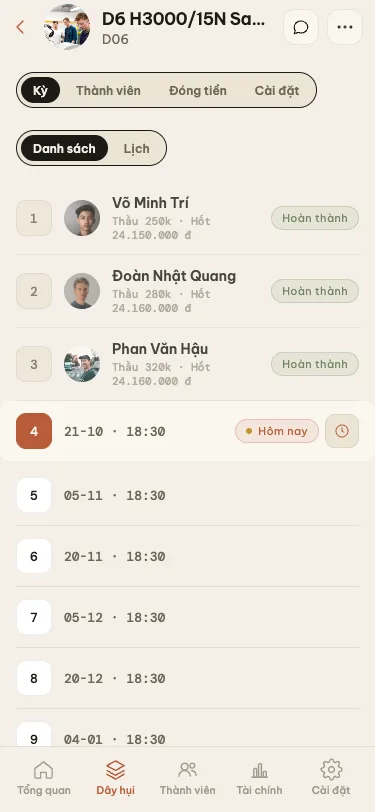
- Periods Timeline: Shows cycle numbers, opening dates, winner identity, winning bid amount, and whether the payout has been disbursed.
- Currently Open Cycle: Displayed at the top of the roster featuring the Close Period (Chốt kỳ) action button.
Procedure to Close a Period (Khui hụi):
- Tap the currently open period and select Close Period.
- Select the winning slot from the list of eligible live slots.
- Enter the Winning Bid Amount (Thăm thầu) (e.g.
350,000 ₫). - Random Spin Wheel: If two or more members submit matching highest bids, or if no bids are placed at the deadline, tap Random Spin. The system renders a fair, transparent animated wheel to select the winner among eligible live slots.
- Tap Confirm: The system calculates total collected funds, deducts host commission, and reveals the exact Net Payout due to the winner.
2. Tab 2: Members (Slots) — Roster & Transfers
The Members (Chân hụi) tab houses the slot registry for the group:
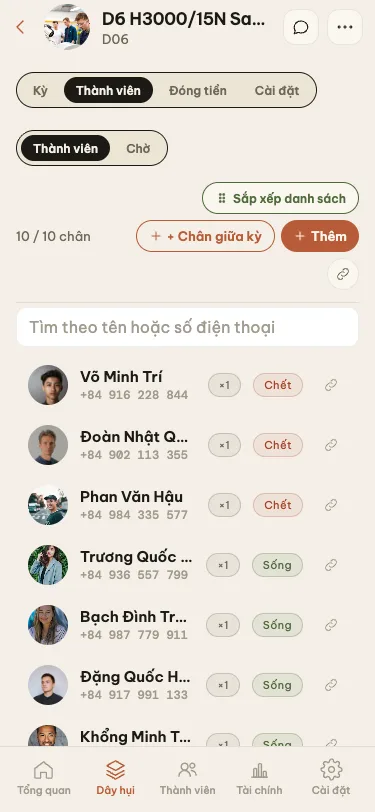
- Live vs. Dead Slots:
- Live Slot (Chân sống): Has not yet won an auction. Pays discounted contributions each cycle.
- Dead Slot (Chân chết): Has already collected payout in an earlier cycle. Obligated to pay the full 100% base contribution in all subsequent cycles until maturity.
- Slot Ownership Transfer: If a participant wishes to sell or transfer their slot mid-stream, tap the slot row -> select Transfer Slot -> choose the replacement recipient. Cumulative historical payments and future liabilities transfer automatically.
- Mid-cycle Slot Additions: Organizers can inject new slots mid-chain with transparent formulaic adjustments.
3. Tab 3: Collection — Invoicing & VietQR
The Collection (Thu tiền) tab eliminates accounting discrepancies and manual calculation errors:
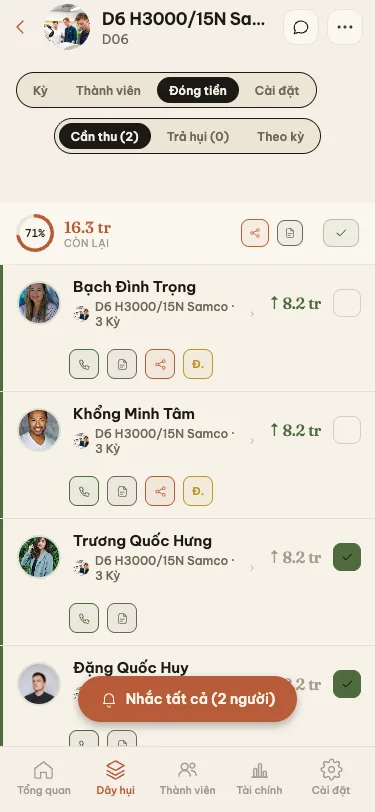
- Automated Collection Sheet: Upon period closure, Huio generates a detailed itemized bill showing the exact obligation for each participant.
- Mark as Paid (✓): Upon receiving cash or wire transfer, tap the green checkmark next to the member's name.
- Partial Payments (Đóng thiếu): If a member pays only part of their dues, enter the partial amount received; Huio automatically records the remaining arrears into the debtor ledger.
- Send Bill with Napas VietQR: Tap Share Collection Sheet to dispatch bills via Zalo or messaging. Every bill embeds a standard Napas 247 VietQR code with exact amount and automatic transfer memo.
4. Tab 4: Group Settings & Specialized Reports
The Settings tab governs group-specific preferences and document generation:
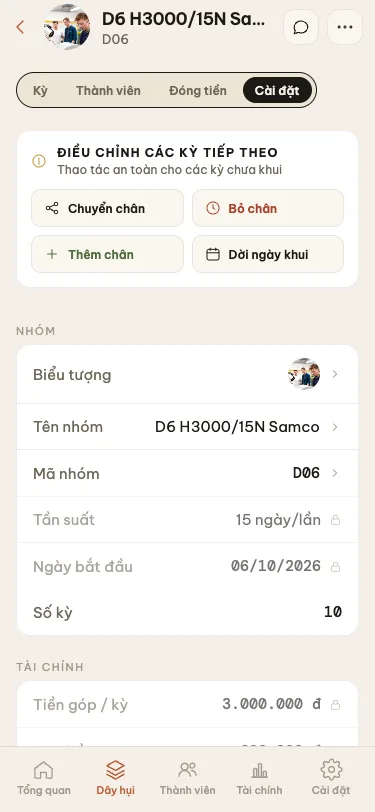
- Account & Preferences: Update the specific receiving bank account for this group, adjust reminder lead times, or change group icons.
- Rollback Last Period: If a human entry mistake occurred (wrong winner or incorrect bid), tap Rollback Last Period. The cycle returns to open status, restoring the winner's slot to live status.
- Activity Log: Transparent audit trail tracking who closed cycles, updated information, or marked payments.
Specialized Reports Modal:
Tap Export Reports in the Settings tab to open the documents dialog:

- Period Summary Report: Complete financial breakdown of a specific cycle: collected funds, commission earned, winner net payout, and paid/unpaid lists.
- Balance & Debt Ledger (Âm dương): Member-by-member financial position audit: total paid vs total collected, analyzing net profits and default risk.
- Group Charter Sheet: Summary document detailing participants and opening dates for distribution at group launch.