
Hui Groups Management & Creation
How to create and manage hui groups: daily, weekly, monthly frequencies, commissions, and group types.
Hui Groups Management & Creation
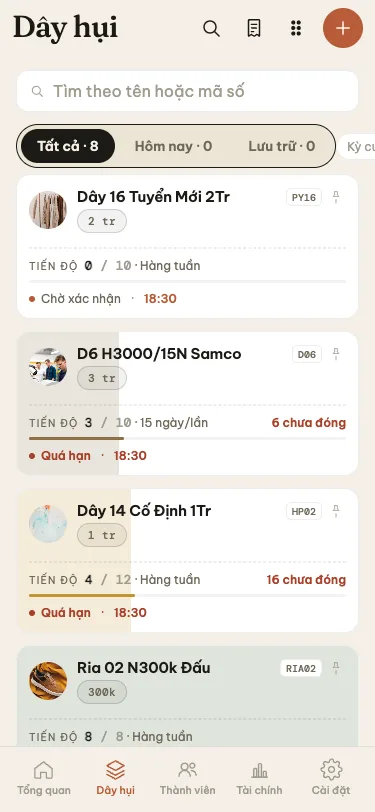
The Groups (Dây hụi) tab is the central hub for managing all rotating savings groups organized by the host, spanning active groups, maturing chains, and completed cycles.
1. Groups Listing & Status Filters
Within the Groups tab, each group card provides an immediate summary:
- Group title and short identifier (e.g.
D6 H3000/15N Samco, codeD06). - Base share amount (tiền chân).
- Current progress status (e.g. Period 4 of 15).
- Breakdown of live slots vs dead slots.
Status Filters:
- Active (Đang mở): Groups currently running and collecting installments.
- Maturing (Sắp mãn): Groups in their final cycles with few remaining live slots.
- Completed (Đã hoàn thành): Fully settled groups with all periods resolved and archived.
2. Step-by-Step: Creating a New Group
To launch a new group, tap the + Create Group button on the top right.
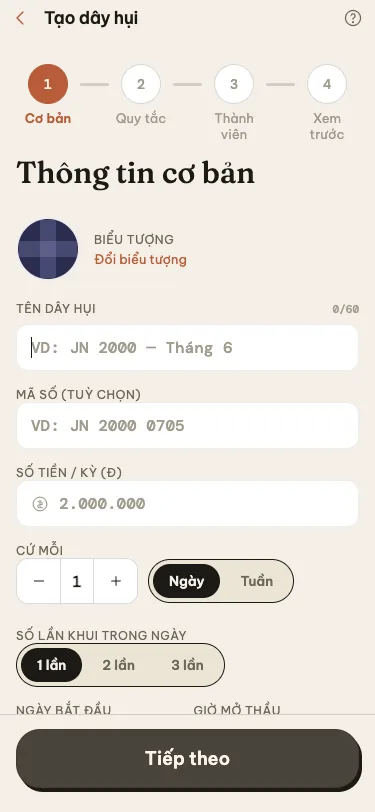
Follow the setup steps below:
Step 1: Basic Information
- Group Title: A distinctive descriptive name (e.g.
Weekly 5M Market Friends). - Short Code: An abbreviated code (e.g.
T05) for ledger reconciliation and VietQR transfer memos. - Icon: Choose a recognizable visual badge for quick identification.
Step 2: Cycle Frequency & Share Amount
- Opening Frequency:
- Daily Hui: Opens once every calendar day.
- 15-Day Hui: Opens on the 1st and 15th of each lunar or solar month.
- Weekly Hui: Opens on a fixed day of the week (e.g. every Monday).
- Monthly Hui: Opens once per month on a set date.
- Base Share (Tiền chân): Base contribution per slot prior to bid discounting (e.g.
2,000,000 ₫).
Step 3: Group Model & Commission Rules
- Group Model:
- Bidding Hui (Hụi đấu thăm): Members submit interest bids; highest bid wins the period.
- Fixed Hui (Hụi cố định): Predetermined interest schedules across all cycles.
- Host Commission (Tiền thảo):
- Per Win (on_win): Host commission deducted from the net payout of each period winner.
- Upfront Period 1 (on_open): Host commission collected in a single lump sum during Period 1.
Step 4: Schedule & Payout Bank Account
- Launch Date & Opening Hour: Scheduled start date for Period 1 and the regular opening hour.
- Payout Bank Account: Select the organizer bank account designated to receive member transfers for this chain (VietQR codes will automatically bind to this account).
Tap Create Group to finalize.
3. Parameter Lock Policy After Group Launch
To ensure integrity and prevent disputes:
- Locked Parameters: Once Period 1 has officially opened, core financial formulas — including Base Share, Frequency, Group Type, and Commission Calculation Method — are permanently locked by the system.
- Editable Settings: Organizers may still update the receiving bank account, postpone or adjust the specific opening time for an upcoming period, or configure automated notification reminder triggers.