
Reports & Data Exports
Comprehensive guide to 12+ reports, export preview, PDF sharing, and Excel data in Huio.
Reports & Data Exports in Huio
Huio provides a professional, accurate, and instant financial reporting and export system designed specifically for hui organizers. All documents are formatted with Huio brand aesthetics, supporting high-resolution image sharing via Zalo/messaging apps, standard A4 PDF downloads for printing, and Excel spreadsheet exports.
1. Export Preview Screen
Whenever you generate any report, billing sheet, or receipt, Huio opens the dedicated Export Preview Screen:
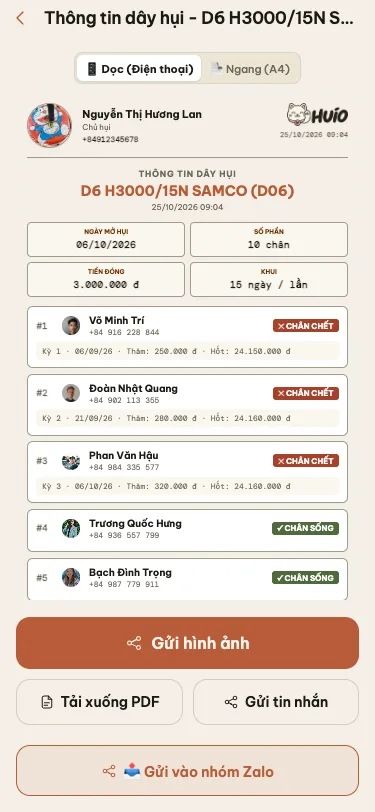
On this screen, you have powerful presentation controls:
- Orientation Toggle (Portrait / Landscape):
📱 Portrait (Mobile): Optimized for smartphone viewing, larger typography, and easy reading when sent via chat messages.📄 Landscape (A4): Standard horizontal print layout with tabular columns, ideal for formal records or office paper printing.
- Share Image Button (
Gửi hình ảnh/ Share Image): Automatically renders the document into a high-resolution image to save to your photo library or share via messaging applications. - Download PDF Button (
Tải xuống PDF/ Download PDF): Generates a crisp vector PDF suitable for email attachments or wireless printing (AirPrint / Wi-Fi Direct). - Send to Zalo Group Button (
Gửi vào nhóm Zalo/ Send to Zalo): Instantly opens Zalo and prefills the document image to send to your group chat. - Copy Text Button (
Gửi tin nhắn/ Send Message): Copies a clean formatted text summary to your clipboard for SMS or 1-on-1 direct messages.
2. Group-Level Reports
Inside any group detail screen, tap the three-dots menu icon (...) in the top-right header and select Reports (Báo cáo) to open the report options sheet:

2.1. Group Sheet / Member Roster (Thông tin dây hụi)
- How to access: Group Details > Menu
...> Reports > Thông tin dây hụi (Group Information). - Content:
- Complete group rules: Start date, total slots count, payment amount per period, cycle frequency (days/weeks/months), and organizer commission fee.
- Slot allocation roster: Order number, member name, phone number, and slot status (live / dead).
- Historical period results: Winner names, winning bid discounts, and net payout sums.
- Purpose: Sent to all group members immediately after finalizing the roster so everyone has full transparency.
2.2. Group Summary / P&L Report (Báo cáo tổng kết dây hụi)
- How to access: Group Details > Menu
...> Reports > Báo cáo tổng kết dây hụi. - Content:
- Overall revenue and expense breakdown from period 1 to the current period.
- Total organizer commission fees collected.
- Payment compliance rates, overdue amounts, and bad debt indicators.
- Gross profit and capital safety margin of the entire group.
- Purpose: For organizers to evaluate group profitability, default risks, and decisions to open new groups.
2.3. Group Balance Sheet (Bảng cân bằng âm dương dây hụi)
- How to access: Group Details > Menu
...> Reports > Bảng cân bằng âm dương. - Content:
- Net financial position of each slot: Total contributed, total collected, and net profit/loss.
- Net Balance (Âm / Dương) column: Clear identification of net debtors (who already claimed payouts, negative/âm) and net creditors (who are still accumulating, positive/dương).
- Purpose: Helps organizers control credit risk for individual participants and coordinate healthy payout schedules.
2.4. Full Excel Export (.xlsx)
- How to access: Group Details > Settings tab > Data & Backup section > Xuất Excel (.xlsx).
- Content: Standard Excel spreadsheet containing the full payment matrix, member records, calculation formulas, and ledger history.
3. Daily & Period Operations Exports
3.1. Today's Collection & Settlement Breakdown (Bảng kê thu chi hàng ngày)
- How to access: Finance screen > Tap the document export button in the top bar (or from the Today's Due Tasks card on Dashboard).
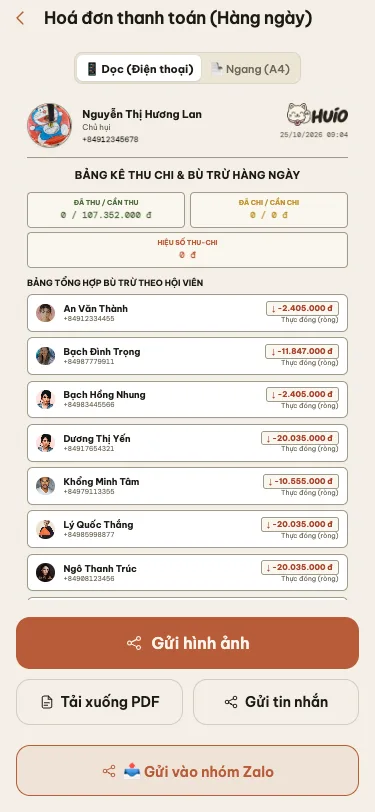
- Content:
- Summary metrics: Total Collected / Due, Paid Out / Due, and Net Cash Flow for the day.
- Detailed breakdown of each member to collect from, with net amounts automatically calculated across all active groups.
- Purpose: Handy reference checklist for field collection runs, ensuring zero missed collections.
3.2. Period Collection Checklist (Bảng kiểm kê thu tiền theo kỳ)
- How to access: Group Details > Collection (Đóng tiền) tab > Tap the export button in the top bar.
- Content: Roster of all participants for the active period, their due amounts based on the winning bid discount, and checklist checkboxes for cash or transfer confirmation.
- Purpose: Tracking real-time collection progress during a bidding round.
3.3. Winner Payout Receipt / Delivery Slip (Phiếu giao hụi)
- How to access: Group Details > Periods (Kỳ) tab > Select completed period > Tap Xuất phiếu giao hụi (Export Payout Receipt).
- Content:
- Winner name, group title, and period sequence number.
- Line-item calculation: Gross pot, minus bidding discount, minus organizer commission fee, minus old debt offsets = Net Payout Amount.
- Signature confirmation lines for both organizer and recipient.
- Purpose: Formal legal and operational proof of money transfer, printable or shareable as an image.
3.4. Member Period Bill with VietQR (Phiếu báo đóng tiền kỳ hụi)
- How to access: Group Details > Collection (Đóng tiền) tab > Tap member card > Send Billing Notice.
- Content: Individual period payment reminder notice featuring a dynamic VietQR code prefilled with the exact due amount and automated transfer syntax.
4. Portfolio & Member Directory Reports
4.1. All Members Consolidated Balance Sheet (Bảng cân bằng âm dương tổng hợp)
- How to access: Members Directory (Danh bạ) screen > Tap the document export button in the top bar.
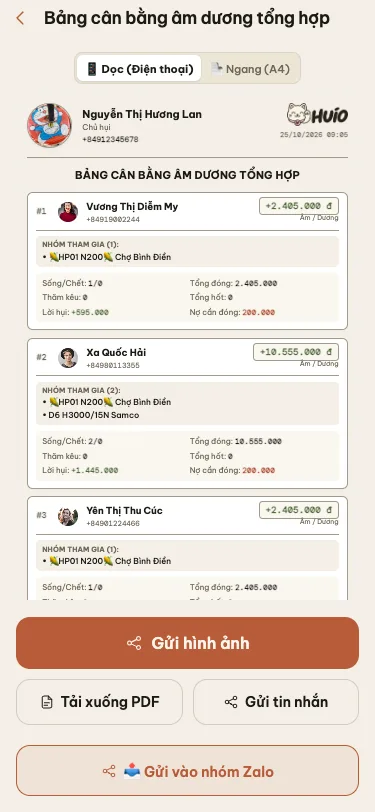
- Content:
- Comprehensive roster of all contacts across every active group in your system.
- For each person: Active groups joined, count of live vs. dead slots, cumulative contributions, total payouts received, pending debt, and overall net Positive / Negative (Âm / Dương) standing.
- Purpose: Executive-level risk management report allowing organizers to monitor total credit exposure and spot high-risk borrowers across groups.
4.2. Individual Member Statement / Ledger (Sổ cái tài chính hội viên)
- How to access: Group Details > Members tab > Tap member name > Tap export button in the top bar.
- Content: Full statement of all contributions, receipts, bidding discounts, and balance history for that specific member.
4.3. Consolidated Multi-Group Bill (Hóa đơn tổng hợp nhiều dây)
- How to access: When a member participates in multiple groups due on the same day/week, the system automatically generates a single consolidated invoice with a unified VietQR code.
4.4. Financial Ledger & Cash Flow Book (Sổ giao dịch dòng tiền)
- How to access: Finance screen > Tap the chart icon (
Sổ tài chính) in the top bar. - Content: Comprehensive cash flow movements classified by day, week, month, along with the active debtors ledger.
4.5. Group Audit & Activity Trail (Nhật ký sự kiện dây hụi)
- How to access: Group Details > Tap clock icon (
Lịch sử/ History) > Tap export button. - Content: Immutable log of all events that occurred in the group: creation timestamp, bidding times, bid adjustments, slot reassignments, and payment confirmations.
5. Reports & Exports Catalog Reference
| Report Title | Navigation Path in App | Supported Formats |
|---|---|---|
| Group Summary / P&L | Group Details > Menu ... > Reports | Image, PDF, Text, Zalo |
| Group Balance Sheet (Âm / Dương) | Group Details > Menu ... > Reports | Image, PDF, Text, Zalo |
| Group Terms & Roster Sheet | Group Details > Menu ... > Reports | Image, PDF, Text, Zalo |
| Winner Payout Delivery Receipt | Group Details > Periods tab > Select Period | Image, PDF, Print |
| Period Collection Checklist | Group Details > Collection tab > Export icon | Image, PDF, Checklist |
| Today's Collection & Net Dues | Finance screen > Top bar export button | Image, PDF, Zalo |
| All Members Balance Sheet | Members screen > Top bar export button | Image, PDF, A4 Table |
| Member Financial Ledger Statement | Group Details > Members tab > Tap Member | Image, PDF, Statement |
| Multi-Group Consolidated Invoice | Finance screen > Member Bills | Image, VietQR, Zalo |
| Financial Ledger & Cash Flow Book | Finance screen > Chart icon (Sổ tài chính) | Image, PDF, History |
| Group Audit & Event Log | Group Details > Clock icon (Lịch sử) | Image, PDF, Text |
| Full Excel Spreadsheet Export | Group Details > Settings tab > Export Excel | Spreadsheet .xlsx |
Frequently Asked Questions
How do I share a report directly into my group's Zalo chat?
On the Export Preview Screen, tap the Send to Zalo Group (Gửi vào nhóm Zalo) button at the bottom toolbar. The app will open Zalo and prompt you to select the group chat. The crisp report image along with a formatted summary caption will be posted immediately.
Can I print reports on physical A4 paper?
Yes. On the Export Preview Screen, select the 📄 Landscape (A4) layout, then tap Download PDF (Tải xuống PDF). You can send this PDF directly to any wireless printer (AirPrint / Wi-Fi Direct) or open it on a desktop computer for clean, border-aligned paper printing.
Do report numbers update automatically when a member makes a payment?
Yes. All reports in Huio are generated in real-time. The moment a payment is confirmed (manually or automatically via VietQR matching), any report exported immediately reflects the updated numbers, balances, and completion percentages.